

What to add when GitHub’s native controls are not enough, when budget matters, or when you want to stay a bit more open
In the first article, the question was how far GitHub’s own controls already get you. The answer was: further than many teams assume, if you actually enable the right ones.
This article starts where that one stops.
There are three common reasons to look beyond GitHub’s native controls:
- you want stronger coverage on private repositories without buying every GitHub security add-on
- you want more transparency and portability in the tooling you rely on
- you want to cover areas where GitHub is simply not the deepest or most practical option
That does not mean replacing GitHub. It means using GitHub for what it is already good at, and adding open-source tools where they close a real gap.
So this article is not a „here are some tools“ list. It is a recommendation: if you want a practical and mostly open GitHub Actions security stack, this is where I would start after getting a first baseline from Scorecard.
If you have not read the native-controls article yet, start with article-1-native-github-controls-draft.md. And if you want the long-form settings reference behind both articles, keep the appendix open in measures-github-actions.md.
Native Controls First, Open Tools Second
The easiest mistake here would be to treat open-source tooling as a substitute for native GitHub governance.
It is not.
If your workflows still have broad token permissions, if nobody really reviews .github/workflows/**, and if any marketplace action can show up in a pull request without scrutiny, then adding scanners on top will help, but mostly around problems that should have been reduced earlier.
So the order matters:
- first, lock down GitHub itself
- then, use OSS tooling to extend the coverage
That is the model I would recommend in customer projects as well.
Think in Control Categories, Not in Tool Names
The best way to build a messy security stack is to start by collecting logos.
The better way is to ask what controls you actually need. Whether you end up with a clean GitHub stack, a powerful paid solution, or a beautiful open-source zoo depends on your situation.
For GitHub Actions, I would break that down into six categories:
- workflow-specific security analysis
- trust assessment for third-party actions and repositories
- update automation and dependency hygiene
- vulnerability scanning and SBOM generation
- adjacent controls such as secret detection
- runner hardening, runtime detection, and observability
Once you do that, the tool choices become much clearer.
1. Workflow Security: Use Zizmor
Zizmor can tell you that your workflow is making dangerous decisions:
- inline
${{ }}expressions inrun:steps pull_request_targetcombined with fork checkouts- unpinned actions
- missing or overly broad permissions
- risky use of
GITHUB_ENVorGITHUB_PATH
In other words, it focuses on the kinds of patterns that frequently show up in PPE writeups.
This is also where our example project was most satisfying, because the results were concrete rather than theoretical. In the test repository, Zizmor correctly failed pull requests that introduced:
- direct script injection via
${{ github.event.* }}insiderun: - the classic Pwn Request pattern with
pull_request_targetplus fork checkout - mutable tag-based action references instead of full SHAs
That is exactly the kind of feedback loop you want: the workflow becomes unsafe, the check fails, the merge is blocked.

2. Baseline and Third-Party Trust: Use OpenSSF Scorecard
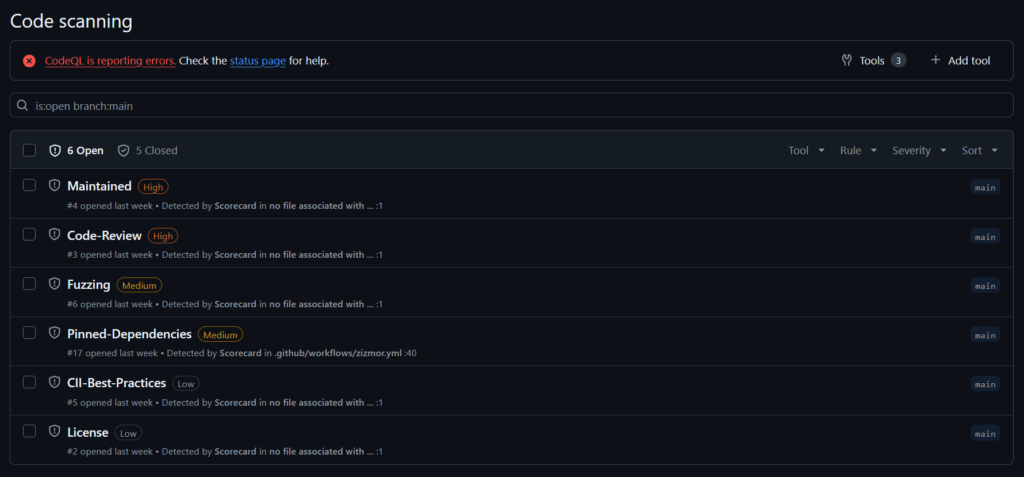
Scorecard is one of the nicest tools in this space because it fits into GitHub so easily. You can run it with a very small workflow, publish the results into the Security tab as SARIF, and get a quick baseline without building much around it.
That also makes it very different from Zizmor. Zizmor looks closely at what your workflow is doing. Scorecard looks more broadly at how well a repository is run and how trustworthy its supply-chain posture appears.
That makes it useful in two ways. First, it gives you an immediate overview of common issues such as branch protection, token permissions, pinned dependencies, and update hygiene. Second, it helps when you need a quick trust signal for third-party repositories and actions. It will not tell you that a project is definitely safe, but it gives you a much better starting point than gut feeling alone.
The checks I would pay attention to first are:
Branch-ProtectionToken-PermissionsPinned-DependenciesDependency-Update-ToolCode-ReviewSecurity-PolicySigned-ReleasesMaintained
3. Update Automation: Use Dependabot or Renovate, but Use It Carefully
Pinned versions only help if they are kept current.
So yes, use automation.
Dependabot is already built into GitHub and is perfectly reasonable for many teams. Renovate is also a strong option if you want more flexibility and customization. I would not turn this into a tool war. The important part is that update automation exists and that teams treat it as part of the security baseline.
There is one caveat here that matters a lot for GitHub Actions: automated updates can also become a supply-chain ingestion path.
The trivy-action compromise is exactly the kind of reminder teams need here. If an upstream action is compromised and your update bot proposes the newly compromised version immediately, the problem is no longer theoretical. That is why cooldown periods and human review matter. A cooldown period means that update PRs are only created for versions that have been published for at least a defined number of days. That delay reduces the chance of ingesting a freshly published compromised release.

So the recommendation is not just „enable Dependabot.“
It is:
- enable update automation
- use cooldown (e.g. 7 days)
- do not auto-merge security-sensitive action updates blindly
- review action updates like supply-chain changes, not like housekeeping
4. Vulnerability Scanning and SBOMs: Use Trivy
To be honest, I have not seen a project that does NOT use trivy in years. Of course Grype is a good contestor as well, but trivy has a richer feature set, which helps especially in developer focused projects that do not yet provide a broad range of well configured tooling.
It simply covers a lot of practical ground without becoming overly complicated:
- dependency vulnerability scanning
- container image scanning
- IaC scanning
- secret scanning
- SBOM generation
That makes it valuable well beyond GitHub Actions, but it is especially useful in Actions because pipelines often become the place where all of those concerns meet.

And yes, recommending Trivy shortly after the trivy-action incident has a certain irony to it. But that incident was a supply-chain problem around a compromised action release path, not a reason to pretend the underlying scanner suddenly stopped being useful.
5. A Low-Hanging Fruit If You Already Use It: Checkov
One more tool worth mentioning is Checkov, simply because it is already present in so many projects to verify if our IaC is secure, especially when it comes to Terraform. If a team already uses it for IaC scanning, it is worth looking at its GitHub and pipeline-related checks as well.

It is not the tool I would center this setup around. Trivy already covers part of the same ground, and Zizmor is much sharper on workflow-specific PPE patterns. But Checkov still helps with GitHub configuration and some pipeline configuration issues, so in an existing stack it can be a useful extra layer and a fairly cheap win.
It is also a good reminder that these tools keep evolving quickly. The cloud-native tooling landscape does not sit still for very long, so the exact boundary between Trivy, Checkov, Grype, and similar tools is likely to keep shifting.
6. Adjacent Control: Secret Detection with Gitleaks
Secret detection is not PPE in the narrow sense. It will not stop poisoned pipeline execution by itself. But it still belongs in a serious GitHub Actions security setup, because leaked credentials often make pipeline incidents much worse than they needed to be.
Gitleaks is fast, widely used, and easy to run both in CI and locally with pre-commit hooks.
GitHub’s paid secret protection still goes a bit further here, especially with generic AI-assisted secret detection and native push protection for private repositories.
But for many teams, Gitleaks already closes the most important gap: hardcoded credentials should not quietly land in the repository.
That was also visible in the test setup. A deliberately committed Stripe key triggered both Gitleaks in CI and GitHub push protection on the public test repository. That is a nice illustration of the general strategy here: use GitHub’s native features where they exist, and let OSS tools cover the places where GitHub charges for them or does not go far enough.

What About Self-Hosted or Custom Runners?
They matter, but I still would not make them the center of this article.
The core OSS stack above is useful for almost every GitHub Actions setup. Runner-specific hardening is more specialized. Once you operate your own runner, the problem gets bigger very quickly: now you care about host hardening, network egress, runtime detection, workload isolation, and how much trust you want to place in infrastructure that still executes untrusted build logic.
So I would treat that as an extension layer. If your runners are containerized, tools like Falco, Tetragon, Cilium, and Grype fit very naturally. If your runners are VM-based, I would lean more on OS hardening and auditing with tools like cnspec, plus host-level logging and network controls.
Most importantly, do not treat observability as optional. If you run your own runners, you need to be able to see process execution, network connections, package installs, and suspicious behavior while the job is still running, not only after the machine is gone. That is where a stack like Prometheus, Loki, and Grafana starts to matter just as much as the blocking controls.
The native GitHub controls for runners are covered in the appendix in measures-github-actions.md. And if you go down the self-hosted path, I would add runtime detection, network restriction, and observability as a separate design step rather than trying to squeeze them into the baseline stack.
Closing
The open-source path is not about rejecting GitHub. It is about deciding where GitHub’s native features are enough, where paid features are worth the cost, and where open tools give you better coverage, more control, or simply a more realistic option for the budget you have.
It is also worth keeping one thing in mind: this article only discussed one item from the OWASP Top 10 CI/CD Security Risks. The tools and practices above help with other categories as well, but that is not a substitute for checking your platform against the full list. Attackers are usually not polite enough to stay inside just one chapter.