

IONOS Cloud
IONOS is a German cloud provider with data centers and regions distributed around the world. They offer a broad portfolio of services, covering everything needed to build and operate a modern cloud environment.
As usual we will look at IONOS‘ offer from two perspectives. Developer Experience and Service Offering.
Developer Experience
IONOS offers the standard set of tools to interact with the cloud environment, including a Web Console, a CLI and an IaC Provider.
IONOS Web Console
Like other providers, IONOS offers a Web Console to explore services and manage your resources. Unlike many others, it follows a unique structure. The Web Console is divided in two major sub-sections, the Data Center Designer (DCD) and a classic cloud management UI.
Data Center Designer (DCD)
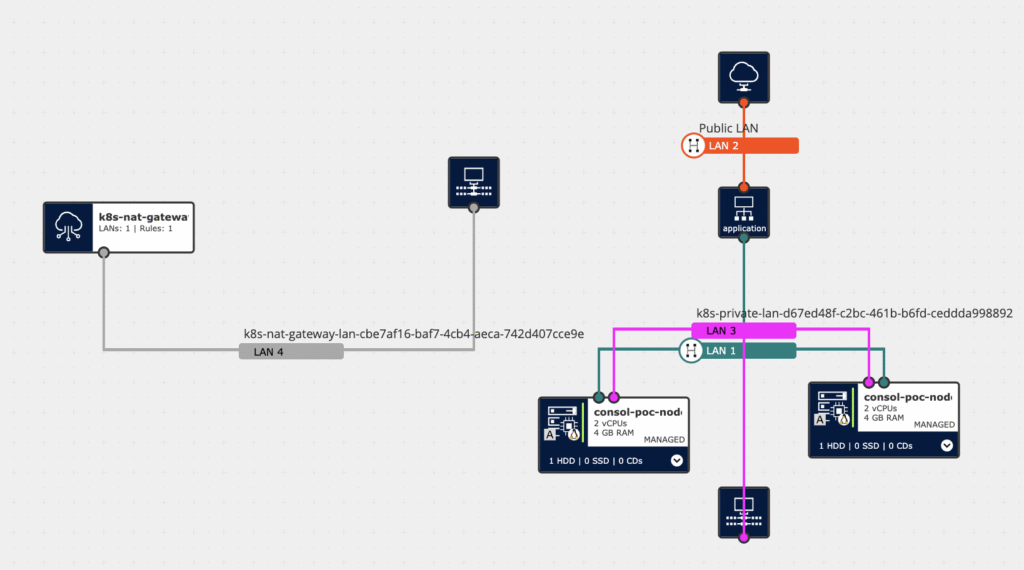
The Data Center Designer provides a graphical interface, that lets you visualize and manage infrastructure. VMs, Load Balancers, Storage Devices and Network Components are displayed as connected nodes in a graph diagram. This makes it easy to see which components were provisioned and how they are connected to each other via the provisioned Network Components. You can also directly see, which components are connected to the internet and which are private.
A key feature of the DCD is transactional processing. Instead of applying applying multiple changes sequentially, you can model multiple modifications in the graphical view and then provision them in a single batch. For example if you want to connect two VMs using a LAN, you do not need to connect one and afterwards the other, but the DCD allows you to visually connect both of your VMs to the LAN and then provision the changes as a single unit, which results in a new version for your Data Center.
Cloud Management UI
Services, that are not part of your Data Center are managed outside the DCD, each with its own dedicated space in the Web Console. This layout is more similar to what you might know from other providers, dividing the services in categories and each service has a dedicated subsection for management.
This part is well structured and feels intuitive, if you have experience with another available cloud provider. That said, during the evaluation, we rarely relied on the Web Console for active resource management, since our primary focus is to define infrastructure as code. Hence making the alternative options (CLI and IaC Provider) a better fit for our workflow.
Overall
The Data Center Designer stands out as a unique feature. Neither the other providers, that we evaluated during this series, nor major players like AWS and Azure offer anything comparable. It’s an excellent tool for visualizing provisioned resources and especially gaining insights in how the network architecture is setup.
This uniqueness comes with a learning curve not present in other providers. Especially since there is no „classic“ UI for provisioning VMs or Network Components. However, once you get accustomed to it, the DCD proves to be a powerful tool that adds real value in day-to-day operations.
One minor drawback is the way resource organization works. Resources created via the CLI or IaC are not automatically arranged in the DCD. To achieve a clean overview, you need to manually rearrange them. Saving these layout changes requires creating a new Data Center version — which feels unnecessary when the modification is purely aesthetic.
IONOSCTL CLI
Similar to Scaleway, IONOS provides its own CLI solution called IONOSCTL. It is available for all major operating systems – MacOS, Windows and Linux – and offers a convenient way to interact with the platform’s APIs.
As mentioned earlier, our preferred approach is the declarative style of a classic IaC solution. Thus, we mostly used the CLI in a read-only manner. Nevertheless, IONOSCTL proved very useful for exploring available options and inspecting the resources we had already created.
Terraform / OpenTofu Provider
The Terraform Provider was our primary tool for managing resources. As described for OTC in Part 2 and Scaleway in Part 3 there isn’t much to mention – which is a good thing. The provider does exactly what it should: it makes resource management straightforward and developer-friendly.
A particularly smooth workflow emerges when combining IONOSCTL (to explore available instance classes, parameters, and defaults) with the well-documented Terraform Provider. This pairing makes it easy to stand up a functional infrastructure in no time.
One minor friction point during evaluation were optional, but computed properties of the Terraform Provider. At resource creation, omitting these values results in defaults being applied. On subsequent operations, the Terraform provider interprets these defaults as differences between the resource state and the IaC configuration — leading to repeated “changes” being shown, even though the infrastructure itself remains stable.
As an example, we did not specify a private IP for a public load balancer. The purpose of this load balancer is to serve internet-facing traffic, while being connected to an internal LAN. While a Private IP must be assigned, it is irrelevant which one exactly, since incoming connections to the Load Balancer will always use the stable Public IP. While there were no functional issues, because updates left the load balancer untouched, the repeated noise of being confronted with this „change“ over and over finally made me set the property to overcome this inconvenience.

Feature and Service Overview
As seen in Part 1 of this series, IONOS checks many of the available boxes, fulfilling most of our Evaluation Criteria. IONOS lacks only two major points in Serverless Capabilities and Managed Messaging.
For the other Services the focus lies on the following:
Project and Account Structure
The management hierarchy for IONOS starts at the Contract level. A contract defines the overall scope of an account and includes Users and Groups, Billing Information and Resource Quotas.
Within a contract, resources are organized into Data Centers. These serve to group VMs, Load Balancers, Storage Devices and Network Components. By default, Data Centers are isolated from each other, but can be connected if required. Other services, that are not part of Data Centers, are managed directly within a contract. They are global for the contract and may be connected to Data Centers if necessary.
IAM Concepts work on the Contract level to specify which actions may be performed by Users or Groups of Users.
Network
At first glance, Network Architecture looks quite different compared to other Cloud Providers. Resources are organized in Data Centers, which are a logical grouping of components. The Data Center does not establish network connectivity between resources.
Within the Data Center there is the single Network Resource LAN. LANs may be private or public, depending on their internet connectivity. Public LANs are directly connected to the internet and are also reachable from the outside. Private LANs on the other side are completely separated from the internet. In order to provide outbound connectivity in a Private LAN, a NAT Gateway must be deployed.
Every LAN is automatically assigned an IPv4 as well as an IPv6 CIDR. Both cannot be specified in advance, but are issued by the provider.
Resources within Data Centers may be attached to multiple LANs simultaneously via multiple Network Interface Cards (NIC). This allows resources to be internet facing, while also communicating to internal components.
To connect multiple LANs together, there are Private Cross Connects (PCC), enabling connections of multiple LANs within the same Region and Organization, even beyond Data Centers.
For Network Security there are Network Security Groups (NSG), that act as centralized stateful firewalls at the Data Center level and there are Instance Firewalls that act at the NIC level, but these can only be attached to select resources that directly offer NICs. They can e.g. not be applied to managed database instances.
Identity and Access Management – IAM
IONOS provides an IAM Concept that differs in some details form other cloud providers, but it covers many common use cases effectively.
Permissions are assigned to Users indirectly by assigning them to Groups which include a set of Users.
In order to create resources within a Data Center a User must explicitly have rights to create resources of this type. For viewing and editing of resources within a Data Center a group needs to get resource-level permissions on the Data Center. These may be read-only or editor permissions. These fine-granular permissions allow specifying exactly, which users should get access to what resources. This concept applies to many resource types, like Data Centers, IP-Blocks and Kubernetes Clusters.
Unfortunately not all services support this fine-granular model. Some services, including the DBaaS (Database as a Service) don’t implement these fine-granular permissions and there it is only possible to grant full access to the service or no access at all. Especially for Databases fine-grained access control is a crucial feature for many projects.
The IAM concept in itself is very conclusive. It is a different approach to what most other providers do, but as seen in many points for IONOS, this is not at all a negative aspect. The coarseness of the access control for some services leaves space for improvement, but in an ever evolving cloud world, we might see this update soon. In the meantime, one needs to keep this aspect in mind and decide whether this is a manageable restriction or not.
Access Control for Object Storage is handled separately. While there is the Option to Allow or Deny access to Object Storage Service completely for Groups, there is also the possibility to use Bucket Policies or Bucket ACLs to restrict access of specific Users to specific Buckets. Furthermore authorization for Object Storage does not work with the standard IONOS Credentials, but rather relies on ACCESS_KEY and SECRET_ACCESS_KEY style of credentials, that may be created for every user account.
Managed Kubernetes
Setting up a Managed Kubernetes Instances with the IONOS Managed Kubernetes Service is straightforward. The created control plane nodes are always reachable from the public internet, while each Node Pool is either public or private. Access to the control plane can be controlled using ACLs.
The Managed Kubernetes has native integration for transferring Kubernetes Audit Logs to an S3 Bucket.
Node Pools are alway bound to one Availability Zone (AZ). They may be private or public and they are flexible in resource scaling and support autoscaling. Even if the Node Pool is selected to be private, a NAT Gateway is required for the individual Nodes to communicate with the Control Plane. Every Node Pool requires a weekly Maintenance Window of 4h. If you have AZ-bound workloads within your cluster, it is highly advisable to have at least two different Node Pools per AZ with different Maintenance Windows, otherwise this might result in downtimes for your application.
Load Balancer
As in previous parts, we evaluated the Load Balancer in combination with the provided Kubernetes Cluster. Again, this is different in IONOS compared to other providers. Private Node Pools do not support the Service Type: LoadBalancer in Kubernetes. Public Node Pools do, but do not provision a dedicated Load Balancer, but rather promote one of the Worker Nodes to handle the load balancing. Since many real world projects want the worker nodes to be private and also want to have a dedicated Load Balancer we opted for the bit more complex, but more real-world viable solution.
IONOS provides three types of Load Balancers. A Classic Load Balancer (CLB), an Application Load Balancer (ALB) and a Network Load Balancer (NLB). Since the ALB and NLB are a bit more modern we chose between these. Our test application is an HTTP-based application and we do not have specific performance or throughput requirements, thus we opted for the ALB.
The ALB gets provisioned separately using IaC and gets assigned a stable floating IP address. It is also connected to a private LAN, where the Kubernetes Worker Nodes reside. The Kubernetes Ingresses are exposed by a Service Type: NodePort on all worker nodes and each worker node is registered as a potential backend target for the ALB. This works seamlessly for delivering the traffic and does not bring any major downsides compared to the Service Type: LoadBalancer solution offered by other providers, except the initial setup complexity.
There are still some drawbacks with this solution that must be considered. Your IaC should be setup in a way, that adding or removing nodes automatically adds or removes them from the ALB Target Group. Also, the described setup does not (yet) support Node Autoscaling, even though IONOS offers this feature. In order to successfully auto scale Nodes and register them as targets for the Load Balancer, one needs to implement their own Node Discovery mechanism, which is not natively provided by IONOS in this case.
Object Storage
IONOS offers the Object Storage service as their version of an S3-Compatible storage solution. Buckets and data can be managed through an S3-compatible client, as well as via the available Web UI. Object Storage offers many of the features known from its AWS counterpart including:
- Object Lock for Enforcing Retention Requirements
- Replication to target buckets (Cross Region replication is possible)
- Versioning
- Lifecycle Rules
- Bucket Policies & Bucket ACLs
- Logging
- Static Website Hosting
- Server Side Encryption (SSE) with IONOS Managed Keys
IONOS currently offers a single Storage Class, which is very similar to the STANDARD or DEFAULT storage class of other providers and there is no automatic possibility to get notified for bucket or object updates.
Access Control for Buckets is, as mentioned in the IAM section, done through Bucket Policies and Bucket ACLs. Like AWS, IONOS advises to use Bucket Policies for best granularity. The Bucket Policies are fully AWS-compatible, also in content and allow very fine-granular control who is allowed to perform which action.
Databases
IONOS provides a managed Database-as-a-Service (DBaaS) offering that includes:
- SQL Databases: MariaDB, PostgreSQL
- NoSQL Databases: MongoDB
- In-Memory Databases: Redis-compatible service
In this section, we focus on PostgreSQL and MongoDB.
Disk Encryption is enabled by default for MongoDB Business and Enterprise editions. Only Playground edition comes without Disk Encryption but is only for small-scale experiments in a development environment anyways.
PostgreSQL currently supports Disk Encryption only for underlying SSDs.
All Databases support encryption in Transit using either self-issued or Let’sEncrypt issued certificates.
DBaaS for PostgreSQL offers different versions with 15 being the latest available version at the time of writing. The database instance must be attached to a LAN and depending on whether the LAN is public or private, the db is reachable from the internet or only internally. Every instance gets a static DNS name, that enables easy failover in case of a disaster. For replication you are free to choose the number of replicas and there are the options of asynchronous, synchronous and strictly synchronous.
The database offers native Point in Time Recovery (PITR). For long term backups, you have to resort to database native tools, like pg_dump and pg_restore for PostgreSQL. Backups are stored encrypted in an S3 bucket.
DBaaS for MongoDB also offers different versions, with 8.0 currently being the latest. Like the DBaaS for PostgreSQL, the instance must be attached to a LAN, which decides whether the database is public or private. You are also free to choose the number of instances and you also get a static DNS Name.
MongoDB offers dedicated snapshots, that are created every 24h. If you choose to buy the Enterprise version you also get PITR and Offsite-Backups.
Container Registry
The IONOS Container Registry is a oci-compliant container registry, that includes Vulnerability Scanning for an additional fee. The Container Registry has separate Pull Token configuration, that is great for technical users or granting access exclusively to the registry. The scope settings for the token very fine-granular.
There are two types of tokens:
- Registry for managing the repos themselves
- Repository for pulling and pushing images.
You can define automatic expiry, path restriction regexes and you can scope the tokens to Admin, Push or Pull permissions. Multiple such permissions may also be combined.
Conclusion
IONOS Cloud offers a broad and well-rounded portfolio of services, with only a few notable gaps: the absence of serverless capabilities and a managed messaging solution. The deployed test architectures worked great and working with the IONOS Cloud was very pleasant, albeit it felt very unfamiliar in the beginning.
IaC using OpenTofu works great and the combination of CLI and Web Console give a great overview. The DCD feels very different to what we know from other providers, but offers unique features, like the transactional update, that would be great also for other providers.
Setting up a private Kubernetes Cluster with a public-facing Load Balancer does take a bit more manual effort than for other providers, but works great when setup and does not incur any extra costs, compared to other providers‘ solution.
IONOS Cloud is a great solution for basically every project, that wants to move to a European Cloud Provider. With this feature-rich Cloud Platform as a solid foundation you will be able to run a great product in IONOS Cloud.
Disclosure
ConSol and IONOS maintain a partnership.