IT automation has successfully conquered the ops and devops toolsets in most companies. It simply is too expensive not to utilize it. And apart from that: In those stripped down ops teams of today there aren’t enough engineers to manually tackle all the work that cloud, container and on-premise environments produce anyway. But somehow it is rare that automation concerns cross the boundaries of their respective projects and departments. And when they do the results are often less than stellar. Why is that?
The not so invisible walls
Most business processes have to cross team boundaries to do anything meaningful. Every process task may have its own responsibilities or may need other knowhow to be done the right way. Lets take a closer look at this situation by a simple example.
Most companies have some kind of process to provision computing power on the in-house hypervisor system, typically still in the form of a virtual machine, short a „VM“. A VM depends on some prerequisites: It typically needs some means of persistent „harddisk“ storage. It also needs its own network identity, an IP at least. While the provisioning of the VM itself falls naturally into the responsibility of the workload platform team those two assets often don’t. The virtual harddisk might need to be provisioned by a storage team which manages the company NAS and its resources. Network identity is often under control of a dedicated networking team which is also is responsible for managing IP subnets for different purposes and their routing
So the complete process to order a VM will cross multiple team boundaries. It might look like this:
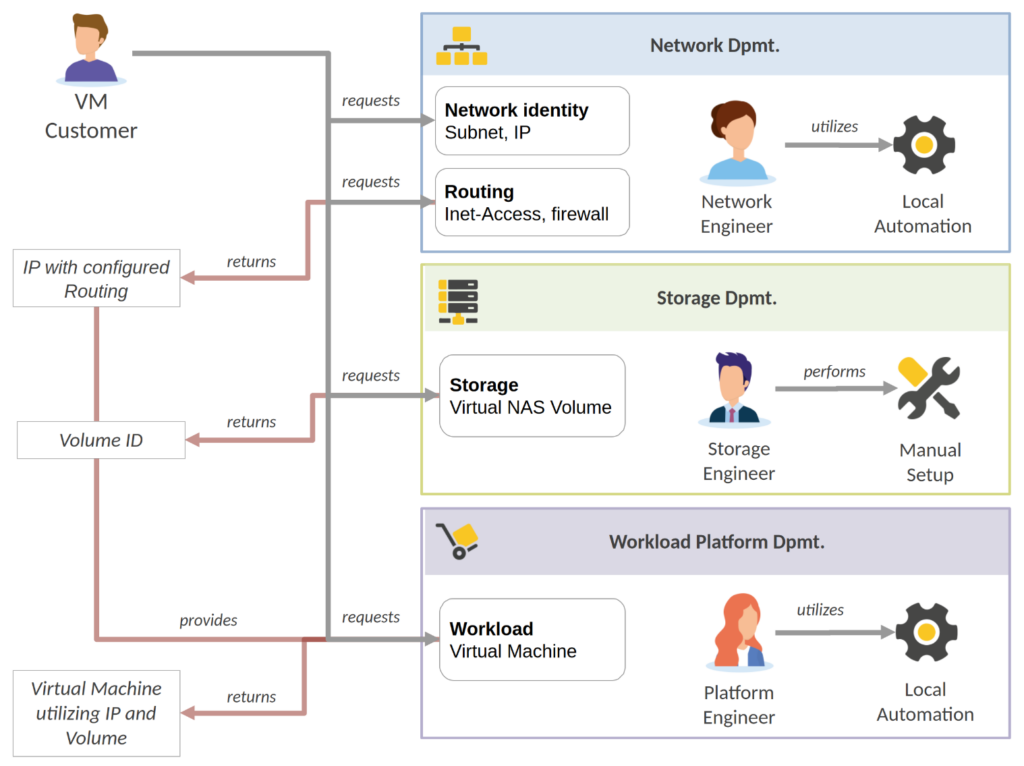
So here the VM customer needs to interact with 3 different teams (which most likely is still a simplification of reality). It is every teams responsibility to ensure that the resources they provide are working and keep doing so. So every team keeps the essential access controls for their systems to themselves. Provisioning these system resources may be an automated process (like seen here for network and workload dpmt.), but typically only the local toolsets of the respective team is utilized. The credentials needed for these automations are of course also kept internally and are noone elses business.
This is a fact that directly contradicts the otherwise logical notion to integrate the team subtasks – the volume creation, the network configuration and the VM provisioning – into one major process. These departments could never throw their automation work together it if it meant sharing their systems access, credentials and process control with other departments.
The result of this is that that the high level process, ordering a VM, stays a manual one. Either it is the VM customers responsibility to „play it right“, like seen in our picture. Or one of the teams goes into a leading role to coordinate the subtasks. Whoever may be in charge: She needs to know the right people to ask, the right tickets to issue and to pass on necessary information between the subtasks.
Orchestration in a nutshell
There is a solution to this: If the departments want to keep control of their domains and the involved automation then you need a level of organisation above automation to wire things together. That organisational level should be able to combine the single automation tasks of every department into a higher level automation process while still allowing every peer complete control over what is performed in their scope. This higher level process on top „knows“ about the right interfaces to use in the right order, can implement a relationship between input and output of these steps, and therefor takes a lot of burden from the VM customer.
This new layer is usually called Automation Orchestration. It is quite similar to regular business process orchestration, only this time with the primary reason to orchestrate automation tasks. Let’s see an example based on the manual process above in the following picture:
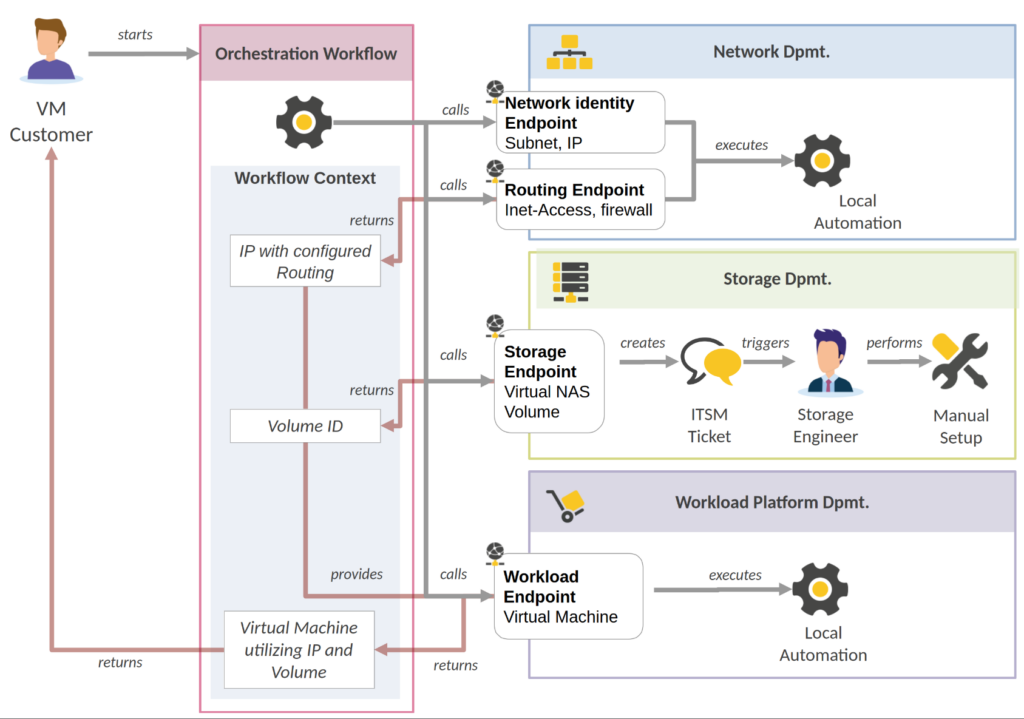
Here you see that our customer now only interacts with something called an „Orchestration Workflow“. That workflow now calls endpoints of department-level automations which do their thing. Where no such automation is yet in place (like in the storage dpmt) it can interact with an ITSM system to get what it wants. It just creates a ticket and waits for it to go into status „done“, no matter who or what did the work behind it. What might feel like cheating is actually the way for many companies to start orchestration, by creating the workflow wiring first and replacing ITSM with automation step by step.
As another important feature to point out in this orchestration workflow is the „workflow context“. This is some „memory“ of the process for multiple purposes. It can store configuration passed to the workflow upon start. It can also store results from individual automation steps and provide them on later steps when needed. In this example the network IP and the ID of the created volume are stored after their allocation and then passed on to the VM creation step.
Orchestration is hard
Sometime orchestration is only introduced on a limited scale. Single crucial processes, where the pain to run them manually makes the effort worth it, are orchestrated using dedicated systems. Even if this may feel to be „not the real thing“ it can be a very valuable opportunity to learn about the problem at hand and get a clearer picture of the requirements that you company really has on the subject.
If you plan to introduce automation orchestration on a larger scale, i.e. you want to introduce a general platform as a go-to tool for orchestrating many enterprise-level automation processes, experience shows that this is a major endeavour. In the least it means that some people of your staff will need to dedicate their time and resources mostly to this target in some kind of „Competence Center“. So, the first question to ask is: is it a goal worth targeting.
Orchestration projects, if for automation or else, have a real risk to fail bigtime. We’ll have a deeper look into the reasons in the next iteration of this blog series, but setting up a central orchestration platform can be a way to burn money quite effectively with little outcome. It may never be used on the grand scale imagined, because of … reasons. It may never reach a state of general feasibility. It may turn out that the way your company does processes is simply not compatible.
That said, the risk of all of these unbeneficial outcomes mostly can be estimated beforehand, be it for the price of some proof of concept project.
So should you really orchestrate?
In the opinion of this author it mostly depends on how well you currently fare with your processes being non-orchestrated and how much time and resources already goes into sustaining this. If you get the impression that this approach wastes a lot of time that you do not have, that the quality of process results is notoriously low because of frequent errors, misunderstandings, wrong approaches, bad communications etc. and effectively keeps you from being an agile, forward-thinking company then it surely is a goal to consider.
The potential benefits are not hard to see: Processes are set „on rails“, they execute in a predictive manner and „connect all the dots“ in the background. This is already a plus even if they only connect multiple ITSM interfaces. Every participant is forced to provide clear interfaces for their process, its states and the provided resources. The processes become observable and could already implement some means of error handling, like retries or even rollbacks.
On the other hand there of course is yet another system to maintain (if you do not already happen to have something suitable in your roster) which will need to mature and grow. Also, not every team that should be participating in contributing functionalities for a centralized process might be excited to do so from the start.
Profile of an automations orchestrator – The basics
So what are we talking about regarding orchestration systems for automation? Lets look at a generic schema:
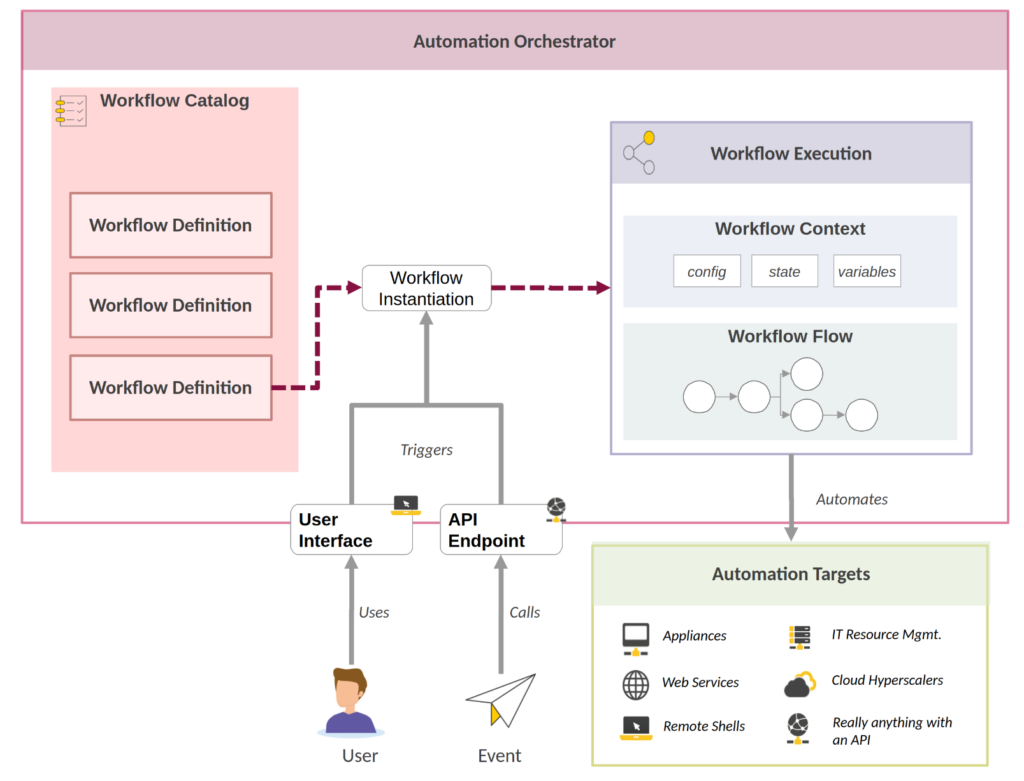
- We need some kind of workflow system that allows to combine multiple individual tasks into larger processes, including the usual toolbox of branching, conditions, confirmation steps etc.
- The available workflow definitions need to be stored in some kind of workflow catalog. This also needs to store the definition of the data input necessary for an workflow execution.
- Users or external events need to be able to actually instantiate a workflow definition into one specific workflow execution. Workflows should generally be able to be executed many times, serially or simultaneously, on behalf of the same or different users.
- These tasks should be able to call external automation targets to perform some operation, wait for their completion and provide results
- The individual workflow execution should have some kind of „workflow context“ where input values are stored that are necessary for the execution. Also this context should be capable of storing output data from the workflow tasks for later usage. Think about creating a volume which returns a volume id. That id will be needed to attach the right volume to the VM later.
That really are the basics which fit with a frustratingly broad spectrum of tools out there.
Profile of an automations orchestrator – The requirements
There are some more specific requirements when talking about orchestating automation, which might not be obvious from the start or necessary for everybody but may play a large role in choosing the right approach. See this more like a „checklist“ to validate your specific needs.
- Scalable throughput: We do not want to be limited by our software on how many workflow we can run in parallel. So there should be some means to scale up workload execution resources when our workloads grow. Of course being container/kubernetes ready would be a huge plus. With scalability also comes the need to actually manage computing resources, i.e. reduce the amount of cpu, memory etc. a single process can utilize.
- Enduring Workflows : The workflows executions might be long running. They should be able to run days, weeks, even months or years. Therefor they should also be stable enough to survive any system reboots healthy, including all of their state and context. Being able to restart a failing workflow exactly at the automation task where it failed would be a really useful feature.
- Multi Tenancy : As stated we need some means of multi tenancy. The departments should be able to provide their own automation tasks, utilizing their own credentials with nobody else interfering. This may happen in the form of some „subflow“ that is owned by the department but can be utilized to participate in a larger workflow by the rules of the owners.
- Feature-rich UIs for configuring workflow execution: No matter how complicated the workflow and its automation tasks, at the beginning most workflow executions start with some kind of configuration input UI, a „form“ of some kind. So orchestration frameworks will definitely need some kind of input form framework on top:
- It should be easiliy usable by form designers and form users alike yet feature rich. Unfortunately the UI/UX experience often is only an afterthought on systems like these although it heavily influences user acceptance.
- It needs to be able to integrate remote data sources like web services dynamically, whose output might feed configuration options or validation
- It needs to support multi-stage forms where one input selection may influence the options available on another input
- Flexible task execution locations : Some automation tasks need to take place in a certain infrastructure location to work. This might just be a certain subnet, it might be the separate IT of some company branch or even an edge location with its manufacturing machinery in reach. So the workflow task execution engine needs some flexibility to say „run it there“. This also needs some concept to access „hard-to-reach“ network locations that might be protected by firewalls and not actively controllable. This is typically solved via active job pulling of the remote location and/or some type of “ hop node“ device.
- A huge bonus is when the workflow system generally can be built up of multiple, relatively independent but cooperating subsystems that could be geographically distributed. That way not only this edge scenario would be solvable. It might also allow the departments to run their own subsystem instance themselves on their own premises and also host their own automation tasks and credentials only there. This would give them complete control over their automation domain.
- A huge bonus is when the workflow system generally can be built up of multiple, relatively independent but cooperating subsystems that could be geographically distributed. That way not only this edge scenario would be solvable. It might also allow the departments to run their own subsystem instance themselves on their own premises and also host their own automation tasks and credentials only there. This would give them complete control over their automation domain.
- Easy Integration with „the regulars“ : There are some obvious choices of systems that need to interact with the workflow. Ideally these typical use cases are already anticipated by your orchestration tool vendor and readymade tools and integrations are provided:
- The automation frameworks „de jour“: Ansible, Terraform, ArgoCD to name our stable core portfolio
- CMDBs where we will want to store and retrieve the status of our provisioned IT resources
- Service management systems: Not all teams will really automate their complete processes. With some you will need to communicate via service tickets (and be it only for a first workaround until their automation is ready). Integrating the creation and monitoring of these tickets therefor might be an important feature.
- Generally good (tenant-aware) Observability, UIs and Observability-UIs : We are building a complicated system that might one day run a gazillion of workflow executions per day. Some of these might fail. Some might stall at some point, some might take an unexpected turn. The customer will want to have good insight into state and problems of the workflow, as will the involved teams. Access to workflow state, logs, traces etc. will also need correct tenant handling so everyone only sees her/his own concern and nothing outside of this:
- Every „customer“ should be able to follow all the executions she started
- A department should be able to follow all the executions of their automation tasks utilized by other people
- The admins of the orchestration tool should be able to see everything that might go wrong
- Your auditor needs to be able to see who is responsible for every execution
That’s it for now. In Part 2 of this blog series we will have a look at some tooling approaches and try to identify the cause why automation orchestration is a hard thing to get right.